“OS:Windows 10/10.0.10240.16384.th1.150709-1700”的版本间差异
跳转到导航
跳转到搜索
Monstercango(讨论 | 贡献) 小 |
YZ22B338807(讨论 | 贡献) 小 (文字替换 -“Windows 8.1”替换为“{{OS|Windows 8.1}}”) |
||
| (未显示2个用户的16个中间版本) | |||
| 第1行: | 第1行: | ||
{{DISPLAYTITLE:Windows 10:10.0.10240.16384.th1.150709-1700}} | {{DISPLAYTITLE:Windows 10:10.0.10240.16384.th1.150709-1700}} | ||
| − | {{NavBar|[[ | + | {{NavBar|[[首页]] > [[目录:Windows 桌面操作系统|Windows 桌面操作系统]] > {{OS|Windows 10}} > [[Windows 10 (初始版本)]] > '''10.0.10240.16384.th1.150709-1700'''}} |
{{Infobox Buildinfo | {{Infobox Buildinfo | ||
| − | |image=10240. | + | |image=Cli-10.0.10240.16384 winver.png |
|imagecaption=Windows 10<br>10.0.10240.16384.th1.150709-1700 | |imagecaption=Windows 10<br>10.0.10240.16384.th1.150709-1700 | ||
|kernel=Windows NT 10.0 | |kernel=Windows NT 10.0 | ||
| 第18行: | 第18行: | ||
2015 年 7 月 28 日作为 Windows 10(初始版本)的正式版发布<ref>[https://blogs.windows.com/windowsexperience/2015/07/28/windows-10-free-upgrade-available-in-190-countries-today/ Windows 10 Free Upgrade Available in 190 Countries Today | Windows Insider Blog]</ref>。 | 2015 年 7 月 28 日作为 Windows 10(初始版本)的正式版发布<ref>[https://blogs.windows.com/windowsexperience/2015/07/28/windows-10-free-upgrade-available-in-190-countries-today/ Windows 10 Free Upgrade Available in 190 Countries Today | Windows Insider Blog]</ref>。 | ||
| − | 相比 [[Windows 10:10.0.10176.16384.th1.150705-1526|build 10176.16384]] 变化不大,但相比[[Windows 10:10.0.10166.0.fbl_impressive.150703-1818|最后一个 Threshold 1 预览版本]] | + | 相比 [[Windows 10:10.0.10176.16384.th1.150705-1526|build 10176.16384]] 变化不大,但相比[[Windows 10:10.0.10166.0.fbl_impressive.150703-1818|最后一个 Threshold 1 预览版本]],此版本移除了水印,并增强了系统稳定性,开发分支从 <code>fbl_impressive</code> 切换到了 <code>th1</code>。 |
2022 年 9 月 20 日,在微软公共符号服务器上发现了该版本 ARM 架构的系统文件。 | 2022 年 9 月 20 日,在微软公共符号服务器上发现了该版本 ARM 架构的系统文件。 | ||
| 第24行: | 第24行: | ||
==注意事项== | ==注意事项== | ||
* '''黑暗模式''' | * '''黑暗模式''' | ||
| − | 导入以下注册表并重启电脑,注意该功能不适用于家庭版。 | + | : 导入以下注册表并重启电脑,注意该功能不适用于家庭版。 |
<pre> | <pre> | ||
Windows Registry Editor Version 5.00 | Windows Registry Editor Version 5.00 | ||
| 第34行: | 第34行: | ||
"AppsUseLightTheme"=dword:00000000</pre> | "AppsUseLightTheme"=dword:00000000</pre> | ||
| − | * '''旧版 Windows 遗留''' | + | * '''旧版 Windows 遗留'''<br>由于来自早期的内部预览版本或 {{OS|Windows 8.1}} 等更早的 Windows 系统的源代码未完全清理,以下一些旧的功能能通过某些特殊方法打开。<br> |
| − | + | **'''Windows 8.X Charm 边栏搜索功能<ref>[https://www.askvg.com/did-you-know-windows-8-search-everywhere-feature-still-works-in-windows-10/ Did You Know Windows 8 “Search Everywhere” Feature Still Works in Windows 10 - AskVG]</ref>'''<br>在运行窗口里输入 <code>rundll32 -sta {C90FB8CA-3295-4462-A721-2935E83694BA}</code> 即可打开。<br> | |
| − | + | ** '''Windows 8.1 样式的开始屏幕'''<br>MetroFetro 曾经在他的油管频道发布过关于在 32 位 Windows 10(初始版本)开启 Windows 8.1 开始屏幕的方法,并包含了修改过的 <code>shell32.dll</code> 和 <code>twinui.dll</code> 和一个注册表项(用于开启旧版开始屏幕)<ref>[https://www.youtube.com/watch?v=cT4SrOqutxg Windows 8.1 Start screen in Windows 10 RTM - YouTube]</ref>。后来他发布了 x64 架构版本替换所需要的文件,但是实装后这一版开始屏幕存在很多问题。<br> | |
| − | * '''Windows 8.X Charm 边栏搜索功能<ref>[https://www.askvg.com/did-you-know-windows-8-search-everywhere-feature-still-works-in-windows-10/ Did You Know Windows 8 “Search Everywhere” Feature Still Works in Windows 10 - AskVG]</ref>''' | + | ** '''Windows 8.1 任务栏跳转列表'''<br>替换一个旧版的 <code>SHCore.dll</code>,会把任务栏跳转列表替换为旧版。同期的 [[Windows Server 2016]] 内部版本也可以实现这个功能。<br> |
| − | 在运行窗口里输入 <code>rundll32 -sta {C90FB8CA-3295-4462-A721-2935E83694BA}</code> 即可打开。 | + | ** '''控制面板遗留'''<br>虽然 Windows 10 将默认通知区域图标设置界面移动到了设置应用,但是在运行窗口输入 <code>explorer.exe shell:::{05d7b0f4-2121-4eff-bf6b-ed3f69b894d9}</code> 也可在控制面板打开对应页面。此功能直到 {{OS|Windows 11}} 依然可用。<br>{{Chide|(看来微软不准备把控制面板给砍了啊?)}}<br>控制面板里的个性化设置:<br>桌面壁纸:运行 <code>explorer.exe shell:::{ED834ED6-4B5A-4bfe-8F11-A626DCB6A921} -Microsoft.Personalization\pageWallpaper</code>;<br>颜色与外观:运行 <code>control color</code> 或 <code>explorer.exe shell:::{ED834ED6-4B5A-4bfe-8F11-A626DCB6A921} -Microsoft.Personalization\pageColorization</code>。<br> |
| − | + | ** '''builds 98XX 样式通知中心(已有部分损坏)'''<br>在 AskVG 上发现开启方法<ref>[https://www.askvg.com/collection-of-windows-10-hidden-secret-registry-tweaks Collection of Windows 10 Hidden Secret Registry Tweaks - AskVG]</ref>。 | |
| − | * '''Windows 8.1 | ||
| − | MetroFetro 曾经在他的油管频道发布过关于在 32 位 Windows 10(初始版本)开启 Windows 8.1 开始屏幕的方法,并包含了修改过的 <code>shell32.dll</code> 和 <code>twinui.dll</code> 和一个注册表项(用于开启旧版开始屏幕)<ref>[https://www.youtube.com/watch?v=cT4SrOqutxg Windows 8.1 Start screen in Windows 10 RTM - YouTube]</ref>。后来他发布了 x64 架构版本替换所需要的文件,但是实装后这一版开始屏幕存在很多问题。 | ||
| − | |||
| − | * '''Windows 8.1 任务栏跳转列表''' | ||
| − | 替换一个旧版的 <code>SHCore.dll</code>,会把任务栏跳转列表替换为旧版。同期的 [[Windows Server 2016]] 内部版本也可以实现这个功能。 | ||
| − | |||
| − | * '''builds 98XX | ||
| − | 在 AskVG 上发现开启方法<ref>[https://www.askvg.com/collection-of-windows-10-hidden-secret-registry-tweaks Collection of Windows 10 Hidden Secret Registry Tweaks - AskVG]</ref>。 | ||
<pre> | <pre> | ||
Windows Registry Editor Version 5.00 | Windows Registry Editor Version 5.00 | ||
[HKEY_LOCAL_MACHINE\Software\Microsoft\Windows\CurrentVersion\ImmersiveShell] | [HKEY_LOCAL_MACHINE\Software\Microsoft\Windows\CurrentVersion\ImmersiveShell] | ||
| − | "UseActionCenterExperience"=dword:00000001</pre> | + | "UseActionCenterExperience"=dword:00000001 |
| − | + | </pre> | |
| − | |||
| − | |||
| − | |||
| − | |||
| − | |||
==相关新闻== | ==相关新闻== | ||
| 第96行: | 第83行: | ||
==功能演示== | ==功能演示== | ||
<gallery> | <gallery> | ||
| − | 10240. | + | Cli-10.0.10240.16384 settings controlpanel.png|“设置”应用和控制面板 |
| − | 10240. | + | Cli-10.0.10240.16384 explorer startmenu.png|<code>explorer.exe</code> 和开始菜单 |
| − | 10240. | + | Cli-10.0.10240.16384 taskmgr msconfig.png|任务管理器和系统配置 |
| − | 10240. | + | Cli-10.0.10240.16384-demo-1.png|演示 |
</gallery> | </gallery> | ||
2025年11月24日 (一) 07:39的最新版本
|
|
|
| Windows 10 10.0.10240.16384.th1.150709-1700 |
|
| 内核 | Windows NT 10.0 |
|---|---|
| 架构 | x86 x64 |
| SKUs | Education Education N Enterprise Home Home China Home N Home Single Language Pro Pro N |
| 语言 | International |
| 编译日期 | 2015-07-09 |
| 过期日期 | 无 |
| 版本字串 | 10.0.10240.16384.th1.150709-1700 |
| 产品密钥 | 使用正式版产品密钥 |

MS-Heritage 页面告示信息:
本词条信息表模板已过时,我们正在逐步对其替换。
2015 年 7 月 15 日推送至快速及慢速通道[1]。
2015 年 7 月 28 日作为 Windows 10(初始版本)的正式版发布[2]。
相比 build 10176.16384 变化不大,但相比最后一个 Threshold 1 预览版本,此版本移除了水印,并增强了系统稳定性,开发分支从 fbl_impressive 切换到了 th1。
2022 年 9 月 20 日,在微软公共符号服务器上发现了该版本 ARM 架构的系统文件。
注意事项
- 黑暗模式
- 导入以下注册表并重启电脑,注意该功能不适用于家庭版。
Windows Registry Editor Version 5.00

[HKEY_LOCAL_MACHINE\SOFTWARE\Microsoft\Windows\CurrentVersion\Themes\Personalize]
"AppsUseLightTheme"=dword:00000000

[HKEY_CURRENT_USER\SOFTWARE\Microsoft\Windows\CurrentVersion\Themes\Personalize]
"AppsUseLightTheme"=dword:00000000
- 旧版 Windows 遗留
由于来自早期的内部预览版本或 Windows 8.1 等更早的 Windows 系统的源代码未完全清理,以下一些旧的功能能通过某些特殊方法打开。
- Windows 8.X Charm 边栏搜索功能[3]
在运行窗口里输入rundll32 -sta {C90FB8CA-3295-4462-A721-2935E83694BA}即可打开。 - Windows 8.1 样式的开始屏幕
MetroFetro 曾经在他的油管频道发布过关于在 32 位 Windows 10(初始版本)开启 Windows 8.1 开始屏幕的方法,并包含了修改过的shell32.dll和twinui.dll和一个注册表项(用于开启旧版开始屏幕)[4]。后来他发布了 x64 架构版本替换所需要的文件,但是实装后这一版开始屏幕存在很多问题。 - Windows 8.1 任务栏跳转列表
替换一个旧版的SHCore.dll,会把任务栏跳转列表替换为旧版。同期的 Windows Server 2016 内部版本也可以实现这个功能。 - 控制面板遗留
虽然 Windows 10 将默认通知区域图标设置界面移动到了设置应用,但是在运行窗口输入explorer.exe shell:::{05d7b0f4-2121-4eff-bf6b-ed3f69b894d9}也可在控制面板打开对应页面。此功能直到 Windows 11 依然可用。
(看来微软不准备把控制面板给砍了啊?)
控制面板里的个性化设置:
桌面壁纸:运行explorer.exe shell:::{ED834ED6-4B5A-4bfe-8F11-A626DCB6A921} -Microsoft.Personalization\pageWallpaper;
颜色与外观:运行control color或explorer.exe shell:::{ED834ED6-4B5A-4bfe-8F11-A626DCB6A921} -Microsoft.Personalization\pageColorization。 - builds 98XX 样式通知中心(已有部分损坏)
在 AskVG 上发现开启方法[5]。
- Windows 8.X Charm 边栏搜索功能[3]
Windows Registry Editor Version 5.00

[HKEY_LOCAL_MACHINE\Software\Microsoft\Windows\CurrentVersion\ImmersiveShell]
"UseActionCenterExperience"=dword:00000001
相关新闻
Windows 10正式发布 用户可以免费升级[6]
    人民网北京7月29日电 (记者 陈键)微软公司今天宣布,Windows 10 今日正式发布,用户可以以免费升级或购买预装 Windows 10 的新 PC 和平板电脑的方式获取 Windows 10。
    微软方面透露,如果用户使用正版 Windows 7 或 Windows 8.1 PC 或平板电脑,升级到 Windows 10 会非常简单。从本周三起,预订了 Windows 10 升级的用户将在准备好安装升级时分批得到通知。企业用户已经可以开始在工作环境中部署Windows 10 ,从 8月1日起,已有批量授权的机构即可升级到 Windows 10 企业版和 Windows 10教育版。

    微软公布的Windows 10多项细节

    1) Windows 10能让用户找到熟悉的体验感觉:'''
    ——包含用户已经熟悉并精通的开始菜单、任务栏和桌面;动态磁贴帮助用户即时了解重要事项的最新情况。
    ——Windows 10 兼容用户已拥有的硬件、软件和外部设备。
    ——免费更新帮助用户获得最新的功能和安全保护。
    ——通过 OneDrive 在线存储,用户可以轻松地在所有设备上共享文件,并随时更新文件。
    2) Windows 10的安全防护:
    ——强化Windows Defender 和 Smart Screen ,帮助用户防止病毒、恶意软件和钓鱼的攻击。
    ——Windows Hello 能够识别用户,为用户提供免密码登陆方式。

    3) Windows 10 更加个性化:
    ——语音、触控笔和手势输入让用户可以更自然地与 PC 互动。
    ——Windows 10 上新的 Office Mobile 应用—— Word、Excel、PowerPoint和 One Note ——即日起在 Windows 应用商店上线。Office Mobile 为移动场景而设计,在小型平板电脑上提供一致、触控优先的体验。全功能 OneNote 预装在 Windows 10 中,满足用户的数字笔记需求。即将发布的 Office 桌面应用 (Office 2016) 将为专业内容创建提供最丰富的功能,适合使用鼠标和键盘进行精确操作。
    ——Cortana是用户的个人智能助理。
    ——贴靠功能和任务视图能够帮助用户轻松地切换应用。
    ——Continuum 融合触控和桌面模式,帮助用户优化应用和体验。

    4) Windows 10 可以提供新的体验和并支持新设备:
    ——新的 Microsoft Edge 浏览器可以让用户可以浏览、阅读,甚至标记和分享网页
    ——整合的 Xbox 应用 把 Xbox 体验带到了 Windows 10,并在 Xbox One 和 Windows 10设备上汇集好友并展示成绩。
    ——Companion Phone 应用让用户的 iPhone 、安卓或 Windows Phone 与 Windows 10设备无缝连接。
    ——Windows 支持目前和未来最具创新力的设备——从手机、平板电脑、PC 到 HoloLens。
功能演示
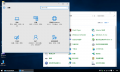
“设置”应用和控制面板
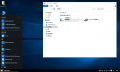
explorer.exe和开始菜单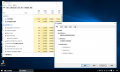
任务管理器和系统配置
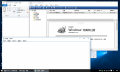
演示


参考文献
- ↑ Build 10240 now available for Windows Insiders in Fast and Slow rings | Windows Experience Blog
- ↑ Windows 10 Free Upgrade Available in 190 Countries Today | Windows Insider Blog
- ↑ Did You Know Windows 8 “Search Everywhere” Feature Still Works in Windows 10 - AskVG
- ↑ Windows 8.1 Start screen in Windows 10 RTM - YouTube
- ↑ Collection of Windows 10 Hidden Secret Registry Tweaks - AskVG
- ↑ Windows 10正式发布 用户可以免费升级--人民网
外部链接
待补充